Example: a multifunctional app
Let’s say you have a fitness app that includes a calorie tracker, recipes, and an AI-powered nutrition analyzer. Previously, Custom Product Pages were only available for ad campaigns. Now, you can group user search queries into clusters and create a dedicated page for each one:
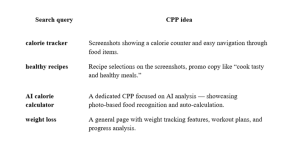
Each of these pages gives users exactly what they’re looking for — which means a higher chance of installs and stronger conversion growth. The best approach is to build small “micro-funnels”: set up separate pages and creatives for different keyword groups and track their performance in analytics.
Limitations and untested metrics
While assigning keywords to CPPs feels like a breakthrough, some users have already run into a few limitations.
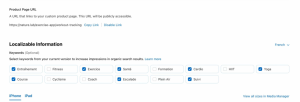
- You can only use keywords from the Keywords field. Apple currently allows CPPs to be linked exclusively to keywords from this field — phrases from the app’s title and subtitle aren’t taken into account. Because of this, developers may need to rethink how they distribute keywords between the title, subtitle, and keyword field — for example, moving or duplicating high-priority queries into the Keywords field if they plan to create CPPs around them.
- It’s unclear how keyword combinations work. At this point, it’s not clear whether Apple will show a CPP for exact single-word matches only, or if it will also combine keywords into longer search queries. According to AppTweak, assigning multiple keywords to a single CPP might create overlap with other pages. That’s why Apple recommends assigning a unique set of keywords to each custom page.
- The number of pages hasn’t changed. The limit of 35 CPPs per app still applies, so developers will need to be selective about which keywords actually need a separate page.
- Localization options are limited. By default, keywords are tied to the app’s primary locale. Some developers have reported that the feature isn’t working for certain languages — likely due to bugs at launch. Apple states that it’s possible to assign keywords for each localization, but in reality, some limitations may apply.
- Custom Product Pages don’t expand your keyword index. Assigning keywords to a CPP doesn’t introduce new search terms to the index. The keywords you assign only affect which version of the product page is shown. They don’t change which queries your app ranks for — that still depends on the main index. You also can’t assign keywords that aren’t already in the Keywords field — App Store Connect will show a data conflict error if you try.
Despite the current limitations, the industry sees this feature as a major step forward. MobileAction calls it a game changer and highlights that Custom Product Pages are now becoming a part of organic user acquisition.
Tips for developers
- Revise your keyword list. The Keywords field is now more important than ever. Add the queries you plan to target with Custom Product Pages and ensure they are separated with commas and don’t repeat your app’s title or subtitle.
- Create dedicated pages for different user segments. Build separate CPPs for different use cases. Don’t stop at screenshots — update the promotional text and video previews as well. The more tailored the page, the higher the chances of conversion.
- Keep an eye on performance. Use App Store Connect to track how each page performs in terms of conversion and retention. Compare the data to see which keywords and creatives drive the best results.
- Avoid keyword overlap. Don’t assign the same keyword to multiple pages. If some keywords are similar, test different combinations and monitor which page is shown to users more often.
- Look for inspiration in Google Play. A similar feature — Custom Store Listings — has been around on Google Play for a while. It lets you customize pages for specific keywords and audiences. Explore successful Android use cases and adapt those ideas for the App Store.
Adding keyword support for Custom Product Pages is a major update for App Store Connect. It allows developers to better match pages to user search intent and increase conversions from organic traffic. To make the most of this new feature, it’s essential to carefully select keywords, work within the 35-page limit, and plan your creatives. The tool is still new and likely to evolve — but it’s already worth testing different use cases and getting ready for a new era of personalization on the App Store.
Custom Product Pages are a powerful tool for optimizing your ASO strategy. They let you create up to 35 versions of your app page, with each iteration tailored to specific search queries. When optimized with the right visuals and messaging, these pages can help your app rank higher and drive more installs. If you’re aiming for top positions on the App Store, we’re here to help — from building a solid strategy and picking the right keywords to creating creatives that boost your visibility and attract new users.






 Alex Vereshchagin
 Anna Chernova
 Sofia Savchenko