



Blog / Category: App Store Optimization. Autor: Alex Vereshchagin. / Developing Your ASO Strategy for Shopify Apps

Developing Your ASO Strategy for Shopify Apps

10 min.
30.Jun.2025

The Shopify App Store rarely comes up in ASO discussions — there’s very little information out there on how to promote apps in this store. That’s exactly what made this case so interesting: it was our first time working with this format, and we ran a full-scale experiment to develop an effective ASO strategy.

The client came to us with a unique request — to promote an app on the Shopify App Store. We hadn’t worked with this platform before, so we had to dive into unfamiliar territory. Shopify is one of the largest e-commerce platforms in the world, powering millions of online stores. Apps on the Shopify App Store help businesses automate operations, improve customer experience, and boost SEO performance.
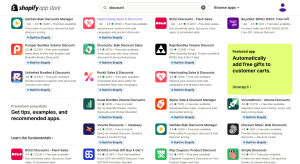
There’s hardly any publicly available information on promoting apps on the Shopify App Store. Most of what we found focused solely on SEO for websites. Even the rare mentions of ASO came down to general advice like “build a semantic core” and “add keywords to the description.” But they didn’t specify which fields to use — and the Shopify console has quite a few of them.

What makes the Shopify App Store similar to the stores we’re used to?

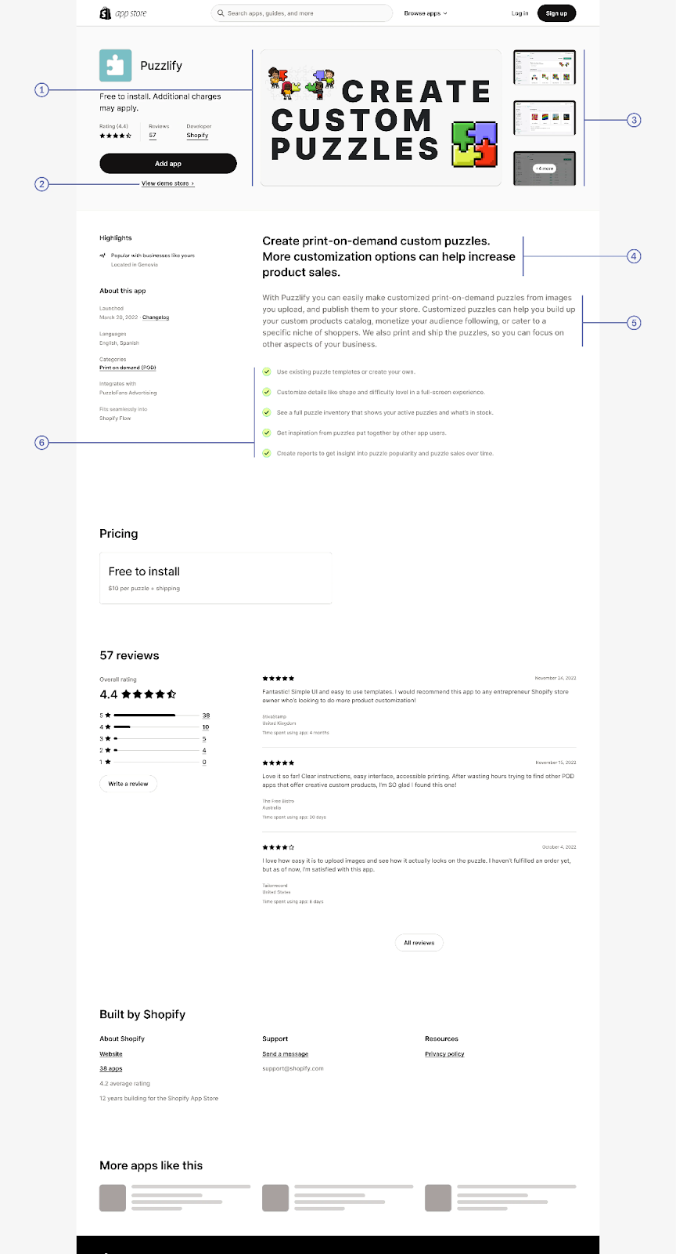
The first thing that stands out is the visual layout. The search results page features familiar elements: an app icon and screenshots on the product page.
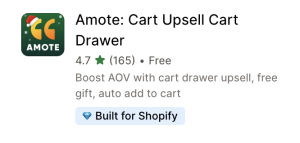
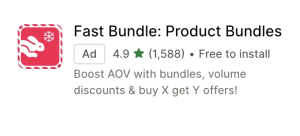
Second, top-ranking apps tend to have high ratings — from 4.3 to 5.0. Most score around 4.9, which means user experience and review management should be a top priority.
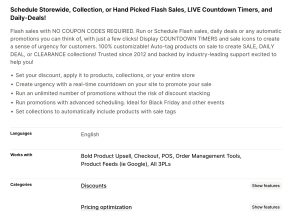
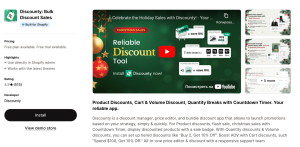
Third, the app page includes elements similar to a Short Description and Full Description: a brief snippet below the screenshots (labeled #5 in the image) and a main description block further down (labeled #6). The app’s categories and supported languages are also displayed.
How does ASO on the Shopify App Store differ from the standard approach?

The number of indexable fields is significantly higher. Some of these affect search results within Shopify itself, while others influence indexing in external search engines like Google. There are also dedicated fields specifically for keywords.

This makes ASO on Shopify a hybrid of classic optimization and SEO. The main challenge is the lack of specialized tools for collecting semantics and running analytics. Most available services only track app rankings in categories — not keyword performance. So we manually entered keywords into the fields and monitored how they affected indexing.

Workflow

Before working with metadata, we had to answer a few key questions:

  • Which fields have the biggest impact on indexing?
  • How do keywords placed in different fields interact with each other?
  • How long does it take for results to show after changes are made?
  • How closely do the actual results align with the recommendations in the guidelines?

For our analysis, we focused on the following areas:

  • Keyword ranking trends — which actions help boost rankings, and which have little to no effect
  • App categories — which categories perform best and how to maximize their potential
  • Keyword effectiveness — which keywords drive the most growth
  • Indexable fields — which fields actually impact ranking, and which don’t
  • ASO strategy — forming hypotheses and defining the next steps for improving text and keyword placement

The Shopify App Store offers plenty of fields for adding keywords, but no clear guidance on which ones have the most impact. So we created our own table, testing different fields and tracking the results.
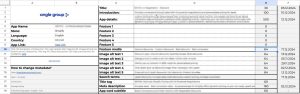
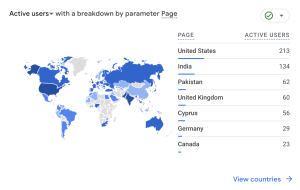
We used data from the Shopify console, Google Analytics, and manual search results for our analysis. All findings were documented in a working spreadsheet to track progress over time.
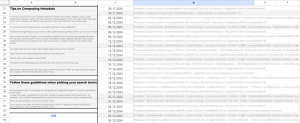
After making the first changes, we started tracking all the keywords used across different fields. Keywords were added, edited, or removed — all of which helped us observe their effect on indexing. For example, on November 28, the app didn’t appear for the query “best discount.” We added the keyword to one of the fields, and the next day it was indexed. On December 6, the keyword was included in the full description, and by December 13, the app ranked first for that query. However, after the client requested the keyword be removed from the description on December 1, the rankings dropped significantly.
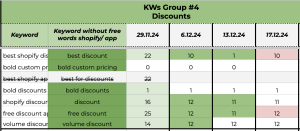
We excluded the keyword “best for discount” from further analysis, as its search results were identical to those for “best discount.” The same applied to keywords like “upsell,” “upsell on,” and “upselling” — they all returned the same results.

On the Shopify App Store, exact keyword matches aren’t required for indexing. However, including them can improve your chances of ranking higher. Shopify’s algorithms take into account not only exact matches, but also synonyms, word forms, and semantically related queries.
Achieve growth with our expertise and unique tools

Let’s connect

When is an exact keyword match relevant?

If a keyword is highly competitive and frequently searched (like “Upsell discounts” or “Dynamic pricing”), using an exact match increases its relevance in Shopify’s algorithm. It’s especially important to use precise phrasing in the fields that have the strongest impact on ranking — such as Title and Search Terms (noting the five-keyword limit).

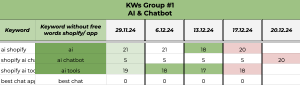
As shown in the screenshot, the keyword “ai chatbot” held a steady position after being added to the Search Terms field. The app maintained strong rankings for about a month, but after the keyword was removed on December 17, its position dropped sharply — falling to 20th place in search results just three days later, on December 20.

What did we achieve?

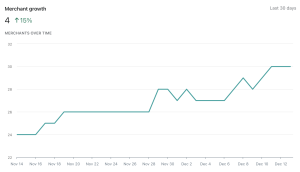
We found that it’s absolutely possible to work effectively with the Shopify App Store. Along the way, we built a solid ASO strategy and saw real growth in the app’s user base.

Which fields matter most for indexing?

  • Title — the most important field for search. A unique title that includes the app’s core function helps boost CTR. High-volume keywords in the title increase your chances of landing on the first page of results. Mentioning key features (like Discount or Upsell) also helps the system categorize the app correctly.
  • Introduction — appears under the screenshots on the app page and carries significant weight for indexing.
  • App Details and Feature — the largest text blocks indexed by the platform. It’s recommended to include high-volume keywords here.
  • Title Tag and Meta Description — fields indexed by search engines. These matter for external SEO: they appear in Google search results and can help attract additional traffic.
  • Search Terms — have a direct impact on internal indexing within Shopify. Once a keyword is added, indexing happens quickly. After removal, a drop in rankings can happen almost immediately.
  • Primary Category Details — Shopify favors apps that are well-optimized for specific categories. Since users often search via categories, it’s important to choose not only relevant but also competitive ones.
  • Image Alt Text and Feature Media — affect internal search results, but their impact is lower, especially if the keywords are already used in other fields.
  • App Card Subtitle — this field plays more of a visual and conversion-boosting role rather than directly contributing to ASO.

Indexation optimization starts with refining the Title, App Details, and Introduction. Proper keyword placement across these fields, along with relevant categories and precise phrasing in Search Terms, will significantly boost your app’s visibility.

Is there any interaction between keywords across different fields?

Yes, Shopify does take keyword overlap across various text blocks into account, and this can strengthen their impact on rankings.

  • Keywords used in the Title carry more weight if they also appear in the Search Terms field. However, even without duplication, your app can still be indexed for the keyword in the title — just with less strength. Example: Title — “AI Discounts & Upsell”, Search Terms — “upsell discounts”.
  • Alt Text can have an indirect impact on visibility, especially when it contains keywords already present in App Details or Search Terms.
  • With that said, Shopify discourages excessive keyword repetition — whether within the same field or across multiple ones. The system can interpret duplication as potential spam, which may reduce keyword effectiveness.

Important keyword pairings to keep in mind:

  • Title + Search Terms — duplication strengthens the impact, especially when the phrasing is an exact match.
  • Search Terms + App Details — strengthens the relevance of your selected keywords.
  • Title Tag + Meta Description — important for external SEO (search engine indexing).
  • Alt Text — has less weight but can further boost indexing if it includes unique keywords.

What can get in the way of effective ASO on the Shopify App Store?

  1. Repeating the app name too many times. The app name is already indexed via the Title field, so repeating it in other fields takes up valuable space that could be used for keywords.
  2. Overuse of keywords in the text. Overloading text with keywords can be flagged as spam and hurt your rankings. In the App Details field, try to keep keyword density under 3–4%.
  3. Using irrelevant or overly broad keywords. These terms are highly competitive and may not accurately reflect what your app does, which lowers your conversion rate. Focus on keywords that clearly describe your app’s core functionality.
  4. Ignoring categories. Categories play a major role in visibility within the Shopify App Store. Choose at least 2–3 that best reflect what your app does.
  5. Weak visuals. It’s important to regularly review competitor visuals (icons and screenshots) and experiment with different ways of showcasing your app’s features and messaging.
  6. Disregarding user feedback. The number and quality of reviews and ratings matter for indexing. Negative feedback can hurt both your rankings and your conversion rate.
  7. Excessive focus on a single field. Every field contributes to indexing. Neglecting some of them limits your app’s overall visibility potential.

When can you expect initial results?

Shopify indexes apps on a regular basis, but how quickly changes take effect depends on the type of field and the competitiveness of a keywords:

  • Title, Search Terms, and App Details are updated the fastest — typically within seven days. However, if a keyword is removed from these fields, a drop in rankings can occur as soon as the next day.
  • Meta Description and Alt Text take longer to index — up to two weeks. This is especially true for less popular keywords or if there are other factors slowing down processing.

If a keyword is highly competitive (like “Upsell discounts”), it may take longer to see results. Less competitive keywords tend to improve visibility faster. 

For example, adding the keyword “b2b” to the Alt Text field didn’t produce any effect — despite low competition, the system didn’t consider it relevant in that field. Meanwhile, when “ai chatbot” was added to the Search Terms, the app appeared in search results the very next day and held its position for nearly a month. After the keyword was removed, there was a sharp drop in ranking.

If a keyword is tied to a popular category (like “Volume discounts”), rankings may start improving within 7–10 days. However, for newer categories or niche queries, it can take longer.

Initial results often appear on page 30 of the search results within 5 days, and if the keyword is relevant, higher rankings may follow within 2–4 weeks. Positive reviews and an increase in installs can speed up the process, while high uninstall rates or low user activity may slow it down.

We recommend checking performance on days 3, 7, and 14 after making changes.

Key steps and recommendations for building an ASO strategy

  1. Competitor analysis. Study which keywords your competitors use in their titles, descriptions, and other fields. Identify the categories they target and how they communicate their unique value proposition.
  2. Building a semantic core
  1. Optimizing key fields
  • Title: add 1–2 relevant keywords and make the title informative.
  • Introduction: elaborate on the title by adding new keywords.
  • App details: include keywords naturally, focusing on your app’s benefits.
  • Search terms: use exact phrases for your most important queries.
  • Image alt text: add long-tail keywords that already appear in other fields.
  1. Visual optimization
  • Icon: high-contrast, clean, and clearly conveys the app’s functionality.
  • Screenshots: consistent in style with the icon and showcase the interface.
  1. Category selection
    Choose relevant categories based on your competitors and user behavior. Mention category-related keywords throughout the app’s text.
  2. Paid traffic strategy
    Use keywords from your semantic core in ad campaigns. Track keyword performance and adjust your strategy accordingly.
  3. Reviews and ratings
    Actively collect user feedback. Maintain a rating of at least 4.8 — this is critical for both visibility and user trust.

____________

If you want to get your app to the top of the Shopify App Store, get in touch — we’ll build an effective ASO strategy tailored to your project.

Alex Vereshchagin, ASO Lead at Angle Agency, specializes in mobile app optimization for international markets, with expertise in East Asia and Austronesia. Alex Consults on app development and has authored books with Ves’, IPIO, and Eksmo since 2016. Outside of work, he enjoys composing music, hosting a podcast on learning the Indonesian language, reading, subtitling, video production, and dubbing Indonesian films.

Written by

Alex Vereshchagin ASO Lead alexv@angletech.ai The ASO Lead at Angle Agency specializes in mobile app optimization for international markets, with expertise in East Asia and Austronesia. Consults on app development, lectures at Asodesk Academy, and has authored books with Ves’, IPIO, and Eksmo since 2016. Outside of work, enjoys composing music, hosting a podcast on learning the Indonesian language, reading, subtitling, and dubbing Indonesian films, and video production. All articles by author

Also read: